Learn free · topic 89
On-Premises vs Cloud
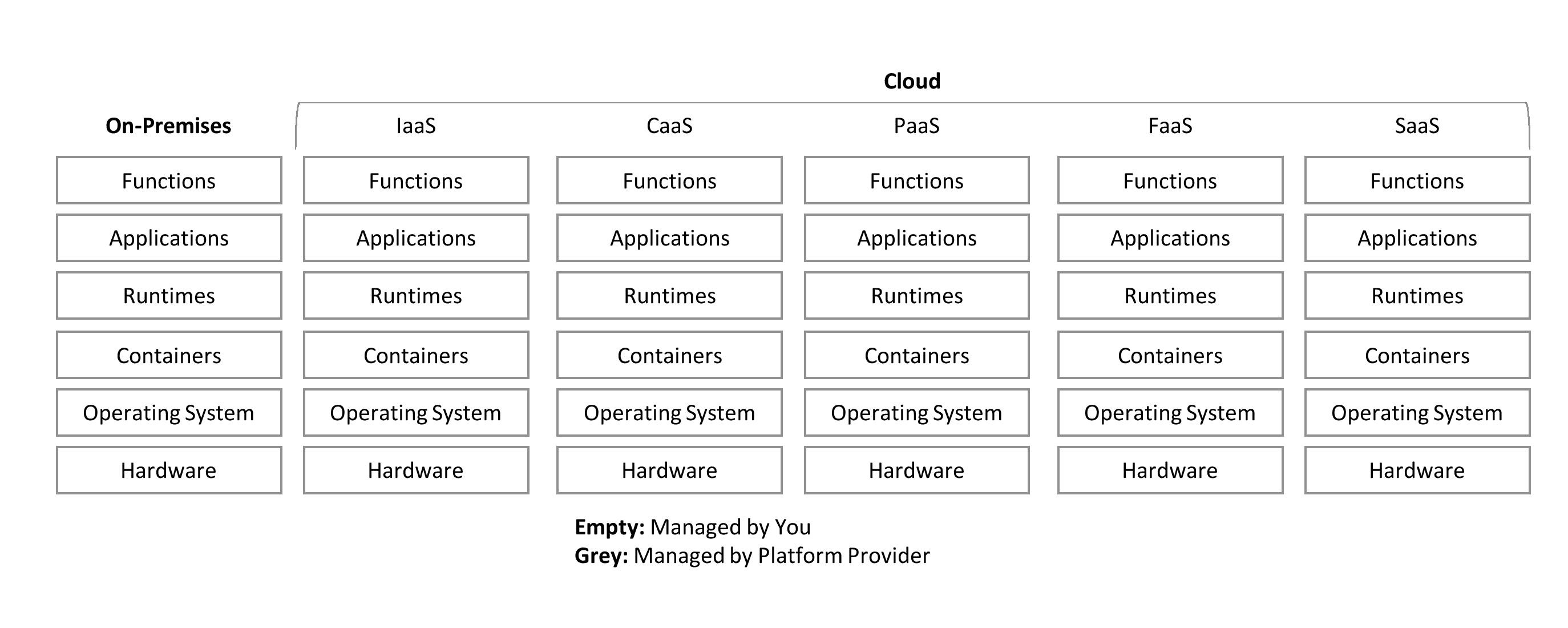
Since years and years Cloud is trying to make a mark but some or the other reason it couldn’t. Now things have changed, in recent era, Cloud has become arguably the biggest buzzword after the Covid-19 pandemic in 2019/20, as organizations had to enable Cloud services for their employees to support their businesses.
Let’s try to understand the core difference, to use IT solutions there are always two options either to have all the software(s) on On-Premises or on Cloud.
On-Premises: When an organization buys servers and infrastructure, and places those inside their own location or building under their own control, managed by their own internal teams, it is called On-Premises.
Cloud: Now when someone else places servers and infrastructure in their location or in their building and manages it for customer where customer accesses those servers and infrastructure via internet, it is called Cloud.
As we have been using on-premises since inception, we won’t go into its details. Let’s try to get a little bit more details into Cloud.
Compute and Storage at a centralized place where all software(s) and its upgrades, DR management, HA management, Auto-scaling, Security etc. are managed by the service provider is called Cloud. Cloud is way more than this definition.
Example:
Let us understand On-Premises vs Cloud with a simple example. For example, you want to use some special software but for that you must buy a special laptop, so you went to the market and bought your own laptop. Now, you install your special software(s) on it, you install security software(s), you enable software encryption, you replaces normal hard disk with encryption disk, you install all MS Office software(s) on it for daily activities, you install database on it, you configure Disaster Recovery and High Availability Strategy like taking backup on an external disk or may be buy another laptop and keep moving data on periodic basic on second laptop so just in case if first laptop crashes, you can continue work on second laptop, then on periodic basis you upgrade all the software(s) on both laptops etc. etc. etc. All the above activities on a self-managed laptop are called On-Premises approach.
Please note, above mentioned activities are just few activities from 100s more when you want to manage IT solutions at organizational level where you must maintain Data Quality, Data Governance, Data Management, Metadata Management, and many other Regulatory and Compliance requirements.
Continuing with the same example, now you say, hey maintaining laptops, maintaining software(s) and upgrades, security measures etc. are taking a lot of time, so let’s find someone like me who has nothing to do in life 😊 or who is willing to maintain your special software(s) and all required activities mentioned above. So, I will buy two laptops and conduct all those required activities on my laptops. Then, I will give access to you via internet to use your special software on my laptops whereas at the same time, it will be my responsibility to manage and maintain the whole environment for you and for that I will charge some operational cost. This approach is called Cloud.
Types of Cloud
- Private Cloud resides in your premises accessible via Intranet.
- Public Cloud resides somewhere around the globe and is accessible via the Internet.
There are many things to consider before moving your data to the Cloud.
- Do Regulatory bodies in your country allows you, based on the nature of your data?
- What is the egress cost of moving data out of the Cloud just in case if you want to move out of the Cloud, how much it’s going to cost?
- Does your selected Cloud service provider have all the tools you need, or does it offer third-party tools?
- In the case of third-party tools, are those available as PaaS, SaaS, or IaaS by the Cloud service provider?
- Do you have an internal skill set to support these Cloud services in the case of IaaS and SaaS?
A major reason to use Cloud is, 90% of semi and unstructured datasets are coming from online applications so it’s worth keeping it in Cloud. For example, social media data is huge and on-premises solutions might not have enough storage. As per stats, only Twitter itself generates 52 TB data daily, so the ideal way is to take that data from social media directly to Public Cloud and process it in there for DSS (decision support systems). Another example is CCTV data which is again huge, it’s not worth downloading it in your on-premises storage for processing.
There are many types of services available on Cloud.
- IaaS: Infrastructure as a Service
- CaaS: Container as a Service
- PaaS: Platform as a Service
- FaaS: Function as a Service
- SaaS: Software as a Service
- DaaS: Data as a Service [Its kind of SaaS]
AAaaS: Advance Analytics as a Service [Its kind of PaaS and SaaS]
Note: Above Cloud services are explained in coming topics.
Finished reading? Test yourself with 10 questions on this topic.
Go to the questions →From I Am Datapedia! by Mustafa Qizilbash, published here free by the author. Nothing about your reading is stored.