Learn free · topic 55
DOCUMENT DATABASES
Document databases store data as JSON-like documents that can contain nested fields, arrays, and variable structures. Instead of organizing information into rows and columns, they treat each document as a self-contained representation of a business object. The goal is to provide flexible schema design and rapid development by allowing complete entities to be stored and retrieved in a single record.
In a document database, each document typically represents one business object. In a loan approval system, for example, a single document may represent an entire loan application. Customer details, loan officer information, approval status, and repayment history can all be embedded within that same structure. Because the schema is flexible, new fields can be added without requiring costly table migrations or rigid schema alterations. This makes document databases particularly attractive in fast-moving development environments.
Consider a loan approval platform implemented using a document database such as MongoDB. A loan application may be stored as a single JSON document that embeds related data:
- A LoanID identifies the document.
- Inside it, a nested Customer object contains CustomerID, Name, CreditScore, and IncomeBand.
- A nested LoanOfficer object includes OfficerID, Name, and Branch.
- LoanAmount, InterestRate, and Status appear as top-level fields.
- An array of Repayments stores each installment with its date and amount.
With this design, a loan officer’s dashboard can retrieve the entire loan record in one query. A mobile banking application can instantly display loan details and repayment history without performing multiple joins. The structure aligns naturally with API payloads, since data is already in JSON format.
This approach delivers several strengths. It is schema-flexible and developer-friendly. It handles semi-structured and nested data naturally. It aligns closely with modern web and mobile application architectures. It supports agile development cycles where requirements evolve quickly.
However, trade-offs exist. Because related data may be embedded within multiple documents, duplication can occur. For example, a customer’s details might appear inside several loan documents. Enforcing global consistency rules, such as ensuring that a customer’s credit score is updated everywhere, becomes more complex than in a relational database. Complex joins across large collections are harder and often less efficient. Consistency guarantees are typically weaker than those provided by traditional relational systems.
Document databases excel when flexibility, speed of development, and API alignment are priorities. In the loan approval context, each loan file effectively lives as a single JSON document, easy to retrieve, easy to serve through services, and easy to evolve. The model favors practical performance and adaptability over strict normalization and global constraint enforcement.
Document databases therefore represent a pragmatic shift from relational theory to workload-driven design. They are not replacements for relational systems but powerful complements in modern, distributed, and application-centric architectures.
Real-World Case (Loan Approval)
A bank implements a loan approval platform using a document database such as MongoDB. Each loan application is stored as a single JSON document that embeds customer details, loan officer details, and repayment history:
{
"LoanID": "L001",
"Customer": {
"CustomerID": "C101",
"Name": "Ali Khan",
"CreditScore": 720,
"IncomeBand": "High"
},
"LoanOfficer": {
"OfficerID": "O11",
"Name": "Ahmed Raza",
"Branch": "Central KL"
},
"LoanAmount": 50000,
"InterestRate": 7.5,
"Status": "Approved",
"Repayments": [
{"Date": "2024-02-01", "Amount": 5000},
{"Date": "2024-03-01", "Amount": 5000}
]}
With this design:
- A loan officer’s dashboard can fetch the entire loan record in one query.
- Customer apps can instantly display loan details and repayment history.
- There’s no need for complex joins across multiple tables, as all related data lives in a single document.
This makes the system fast, flexible, and API-ready, at the cost of some data duplication (e.g., customer details may appear in multiple loan documents).
Relational vs Document Model (Loan Approval)
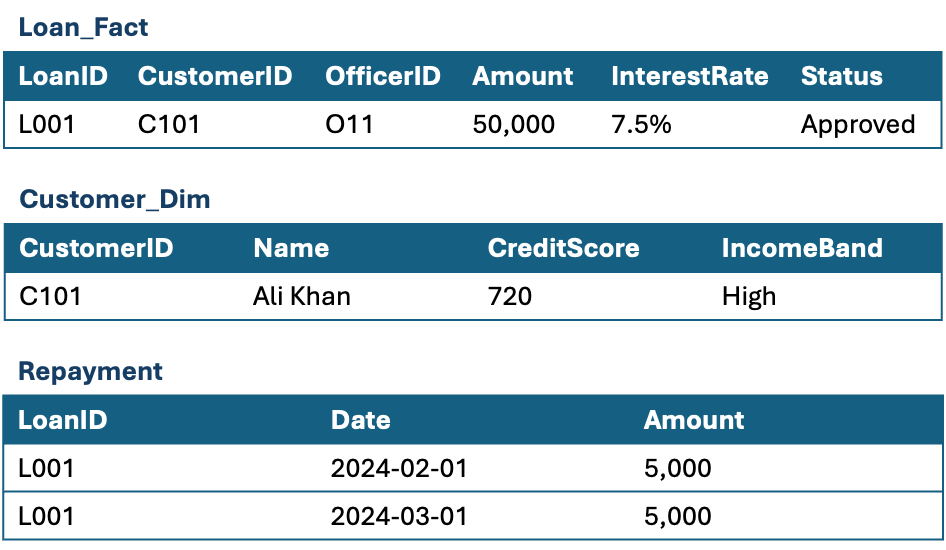
Relational Model (Fact + Dimensions)
- Loan stored in a Fact Table, linked to Customer, Officer, Branch, and Repayment tables.
- Normalized: reduces redundancy, ensures consistency.
- Requires multiple joins to assemble a full loan record.
Example Tables
Document Model (JSON Document)
Loan + Customer + Officer + Repayments stored in one document.
Denormalized: some duplication possible.
Eliminates joins, all data retrieved in a single read.
{
"LoanID": "L001",
"Customer": {
"CustomerID": "C101",
"Name": "Ali Khan",
"CreditScore": 720,
"IncomeBand": "High"
},
"LoanOfficer": {
"OfficerID": "O11",
"Name": "Ahmed Raza",
"Branch": "Central KL"
},
"LoanAmount": 50000,
"InterestRate": 7.5,
"Status": "Approved",
"Repayments": [
{"Date": "2024-02-01", "Amount": 5000},
{"Date": "2024-03-01", "Amount": 5000}
]
}
Key Difference
- Relational: best for consistency, integration, and complex queries.
- Document: best for agility, speed, and serving data to apps/APIs.
Object-Oriented vs Document Data Modelling
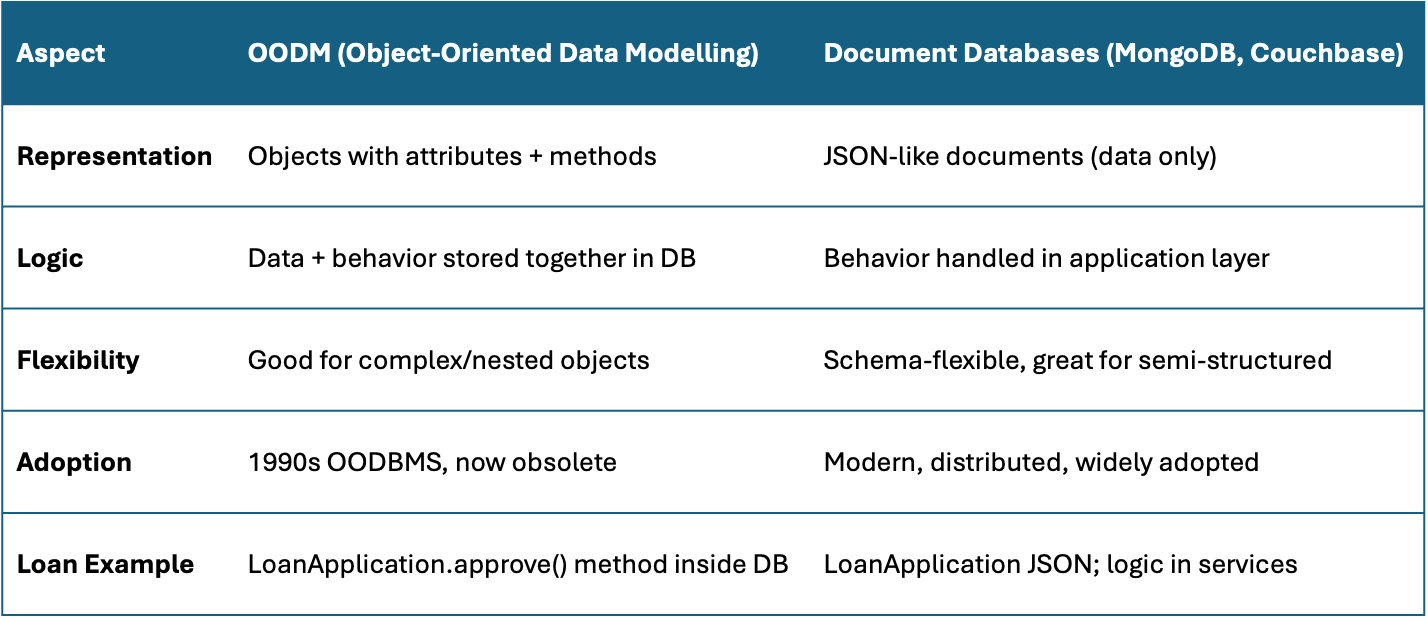
“OODM looks like Document modelling, because all three represent entities as rich, nested objects. The difference is that OODM bundled logic with data inside the database, while Document DBs separate storage from application logic.”
What OODM resembles
OODM looks very much like Document Data Modelling (especially JSON payloads). Here’s why:
Document Databases (MongoDB, Couchbase)
- OODM = Objects with nested attributes and references.
- Document DBs = JSON documents with nested fields and arrays.
- Both aim to capture a whole business entity in one object/document.
- Example: A LoanApplication object in OODM ≈ a JSON document in MongoDB.
Why they’re not the same
- OODM: Tried to make the database itself object-oriented (data + methods stored together).
- Document DBs: Keep only the data representation; logic lives in application code or services.
Finished reading? Test yourself with 10 questions on this topic.
Go to the questions →From I Am Datapedia! by Mustafa Qizilbash, published here free by the author. Nothing about your reading is stored.