Once you sign in, your details will show here.
Knowledge Hub
+ New Topic
Filter (2)
Sort
52 topics · Data Storage and Operations · Intermediate · 10 shown
Show allEvery topic is free to read. A free account also lets you search the topics, react to a topic and comment under it.
- I Am Datapedia!
Data Quality
Testing vs QA
Testing and Quality Assurance (QA) are commonly mixed up, but let's break down the differences.
Testing:
Testing is about discovering problems or bugs in processes or code, either during or after implementation. Various stages of testing happen during an IT project, such as Unit Testing (checking individual parts), System Integration Testing (verifying components work together), and User Acceptance Testing (ensuring the solution meets user requirements).
QA (Quality Assurance):
QA, on the other hand, is all about making sure that the standards and output of processes or solutions meet customer satisfaction. Even if testing doesn't find bugs, QA checks if the output aligns with the expected quality. For example, if we create a table with a million rows, testing may show all rows are there, but QA might reveal differences in country name spellings or data formats.
For example, imagine you're building a database with country names. Testing might confirm that all million rows are there, but QA would catch if the spellings were inconsistent or if data formats are not uniform.
2 min readMore
- I Am Datapedia!
Data Storage and Operations
Sandbox
Sandbox typically refers to a controlled and isolated environment where data scientists, analysts, or developers can explore, test, and experiment with data without affecting the production environment. The concept is borrowed from the idea of a children's sandbox, where they can play and experiment freely within a confined area.
Here are key aspects of a Data Sandbox:
- Isolation: A Data Sandbox is isolated from the production environment to prevent any unintended consequences or disruptions. It allows users to experiment without affecting critical systems or data.
- Experimentation and Testing: Users can perform various activities, such as running queries, testing algorithms, or developing and refining code, in a risk-free environment. This is crucial for data analysis, machine learning, and software development.
- Data Exploration: Data Sandboxes often provide a space for exploring datasets, trying out different queries, and gaining insights without altering the original data or systems.
- Prototyping: Data scientists and developers can use the sandbox to prototype new solutions, algorithms, or models before deploying them to the production environment.
- Learning and Training: Sandboxes are valuable for training purposes. Data professionals can use them to train and educate others without the risk of impacting live systems.
- Security and Access Control: While sandboxes are designed for experimentation, they still need to adhere to security best practices. Access controls and permissions are implemented to ensure that sensitive or confidential data is not misused.
- Version Control: Some Data Sandboxes incorporate version control mechanisms, allowing users to track changes and revert to previous states if needed.
- Data Masking and Anonymization: To comply with privacy regulations, data in a sandbox may be masked or anonymized to protect sensitive information while still allowing meaningful analysis.
- Integration with Development Processes: Sandboxes are often integrated into the overall development and deployment processes, enabling a seamless transition from testing and experimentation to production deployment.
2 min readMore
- I Am Datapedia!
Data Storage and Operations
House Keeping
Housekeeping refers to the routine maintenance, organization, and management tasks that are necessary to ensure data quality, integrity, and efficiency. It involves activities such as cleaning, organizing, and optimizing data to keep databases, data warehouses, and other storage systems in good order.
With an optimistic outlook, effective housekeeping measures have the potential to save approximately 30% of operational costs.
Here are some examples of housekeeping tasks in the Data World:
- Data Cleaning: Identifying and rectifying errors, inconsistencies, or missing values in datasets. For example, if you have a dataset with student information, data cleaning may involve fixing typos in names, standardizing date formats, and filling in missing grades.
- Data Deletion: Removing obsolete or unnecessary data to free up storage space and reduce clutter. For example, deleting records of students who have graduated or left the school to keep the dataset relevant and manageable.
- Backup and Recovery: Regularly creating copies of data to prevent loss and establishing procedures for data recovery in case of accidental deletion or system failure. For example, saving multiple copies of your project work on different devices to avoid losing progress if a file becomes corrupted.
- Data Archiving: Moving older or less frequently used data to long-term storage to optimize performance in the primary data storage system. For example, archiving past school year records to a separate folder to keep the current year's data easily accessible.
- Indexing: Creating indexes on databases to accelerate data retrieval and query performance. For example, indexing a list of books by title or author's name for quicker reference when searching for specific information.
- Data Encryption: Applying encryption to sensitive data to protect it from unauthorized access. For example, using encryption tools to secure personal information in a project related to online privacy.
- Metadata Management: Organizing and documenting metadata (data about data) to enhance understanding and usability. For example, creating a spreadsheet that documents the meaning and format of each column in a dataset.
- Data Purging: Removing data that is no longer needed or relevant, especially in compliance with data retention policies. For example, deleting survey responses from previous years to keep the dataset focused on recent data.
- Performance Optimization: Fine-tuning databases and queries to improve overall system performance. For example, adjusting settings in a gaming app to improve its performance on a smartphone.
3 min readMore
- I Am Datapedia!
Data Governance
SLA
SLA stands for "Service Level Agreement" A Service Level Agreement is a contractual agreement or commitment between a service provider and a customer that outlines the level of service expected, including the quality, availability, and responsibilities related to the service. SLAs are commonly used in various industries, including the data and technology sectors.
Here's a breakdown of key aspects of SLAs in the data world:
- Quality of Service: Specifies the expected quality, accuracy, and reliability of the data service. For example, a data storage service may have an SLA stating that data will be stored securely, with minimal risk of loss or corruption.
- Availability: Defines the agreed-upon level of uptime or availability for a data service. For example, an SLA for a cloud-based data storage service might guarantee 99.9% uptime, ensuring that the service is accessible to users for the vast majority of the time.
- Response Time: Outlines the expected time frame within which the service provider commits to respond to queries, issues, or requests. For example, an SLA for a data analytics platform may specify that support tickets will be addressed within 24 hours.
- Data Security and Privacy: Addresses the security measures in place to protect data and the adherence to privacy regulations. For example, an SLA for a data processing service may include provisions for encryption, access controls, and compliance with data protection laws.
- Scalability: Defines how the service will scale to accommodate increased data volumes or user demands. For example, an SLA for a cloud-based database service might specify the procedures for scaling resources based on increased data loads.
- Data Backup and Recovery: Outlines procedures for regular data backups and the expected timeframe for data recovery in case of a failure. For example, an SLA for a data storage service might include provisions for daily backups and a commitment to restoring data within 48 hours in case of a system failure.
- Compliance: Addresses adherence to relevant industry standards, regulations, and legal requirements. For example, an SLA for a healthcare data management system might specify compliance with healthcare data privacy regulations such as HIPAA.
- Termination and Penalties: Outlines conditions under which either party can terminate the agreement and may include penalties for non-compliance. For example, an SLA might specify the process for termination if the service provider consistently fails to meet agreed-upon service levels.
3 min readMore
- I Am Datapedia!
Data Storage and Operations
Materialized View
Materialized View is a database object that stores the output of a query. Unlike a regular view, which is a virtual table derived from the result of a SELECT query, a materialized view physically stores the data in a structured form. This precomputed data can be periodically refreshed to reflect changes in the underlying tables.
It is a snapshot of the data at the time the materialized view was last refreshed. You create a materialized view by defining the structure of the view and specifying the query that populates it.
CREATE MATERIALIZED VIEW EmployeeProfile
AS
SELECT Employee.*, Department.*
FROM Employee, Department
WHERE Employee.DeptID = Department.DeptID
In this example, we create a materialized view named " EmployeeProfile " that summarizes Employees Details based on Employee and Department tables.
Unlike regular views, materialized views store the data physically. The result set of the query materialized, meaning it's stored in a table-like structure within the database.
3 min readMore
- I Am Datapedia!
Data Storage and Operations
External Tables
In the data world, when we work with databases, we often encounter scenarios where the data we want to query and analyze resides outside the database itself. This could be in the form of files, such as CSV (Comma-Separated Values), Parquet, or JSON files, stored in external storage systems like Hadoop Distributed File System (HDFS) or cloud storage platforms such as Amazon S3 or Azure Blob Storage.
Now, imagine a situation where we have large datasets stored in external files, and we want to treat them like database tables for analytical purposes. Here comes the concept of external tables.
External Tables are a database feature that allows you to define a table structure within the database, but the actual data is stored externally, typically in files. To create an external table, you specify the table structure (columns, data types) in the database, and you also provide a location that points to the external storage where the data files are stored.
3 min readMore
- I Am Datapedia!
Data Storage and Operations
UDF
UDF stands for User-Defined Function. It is a feature provided by many programming and database languages that allows users to define their own functions to perform specific tasks. UDFs are particularly useful for encapsulating commonly used logic, promoting code reusability, and enhancing the readability of code.
Few examples of UDFs in different programming and database contexts:
1. SQL UDF (User-Defined Function):
In SQL, you can create user-defined functions to perform specific tasks. Here's an example of a simple UDF in SQL that concatenates two strings:
-- SQL UDF Example
CREATE FUNCTION ConcatenateStrings(@str1 NVARCHAR(MAX), @str2 NVARCHAR(MAX))
RETURNS NVARCHAR(MAX)
AS
BEGIN
RETURN @str1 + ' ' + @str2;
END;
You can then use this UDF in SQL queries:
SELECT ConcatenateStrings('Hello', 'World') AS Result;
-- Result: Hello World
2. Python UDF:
In Python, you can define functions to encapsulate logic. Here's a simple example of a Python UDF that calculates the square of a number:
3 min readMore
- I Am Datapedia!
Data Storage and Operations
Materialized View orTemporary Tables in SQL
In typical SQL world (Structured Query Language), usually managing and manipulating data efficiently is very crucial for its performance, database lifecycle or DWH scalability. Temporary tables and materialized views are two powerful constructs (objects) that help in achieving both objectives simultaneously. Even though each serves a unique purpose within data operations and data streams. Let´s look at both little closer.
Temporary Tables
We can define them as typical tables which are created within a database session and are only available during the lifetime of that particular session. Lifetime during session is critical as they are designed to store intermediate results, results of window functions for complex calculations or data processing tasks and massive data manipulations.
Temporary tables are essentially useful in scenarios where data needs to be temporarily held and manipulated without affecting the main database tables. Here comes why it is called “temporary”. After your session ends, the temporary table is automatically discarded - same as you run command DROP TABLE, after query results are taken into another step. This way processing ensures no permanent database storage is consumed. You can imagine storing all 245 steps and their output tables consisting of 6 billion rows and 700 columns each day to have versions of each step.
3 min readMore
- I Am Datapedia!
Data Governance
ILM – InformationLifecycle Management
Let’s start by breaking down each part of this acronym based on the context of its usage.
- Information – In this case the Information is related to the usage of the related data stored in a database or a data platform.
- Lifecycle – The standard definition for life cycle is the different stages of life for a living thing. In this case the living thing is the Data. The Lifecycle for data is classified based on its usage as: - ‘HOT’, ‘WARM’, ‘COLD’ and that also could be extended to ‘DEAD’ for deleted.
- Management – The process to facilitate the movement of the data related to the information over its Lifecycle.
So, using the context above, Information Lifecycle Management (ILM) is the process to optimize data storage by automatically tiering data to different locations based on its age, access frequency, and required read/write speeds. This approach minimizes storage costs by placing frequently accessed data in high-performance tiers and infrequently accessed or archived data in lower-cost tiers. ILM can also simplify data archiving and deletion according to data retention policies.
7 min readMore
- I Am Datapedia!
Data Storage and Operations
Performance in Data Lake
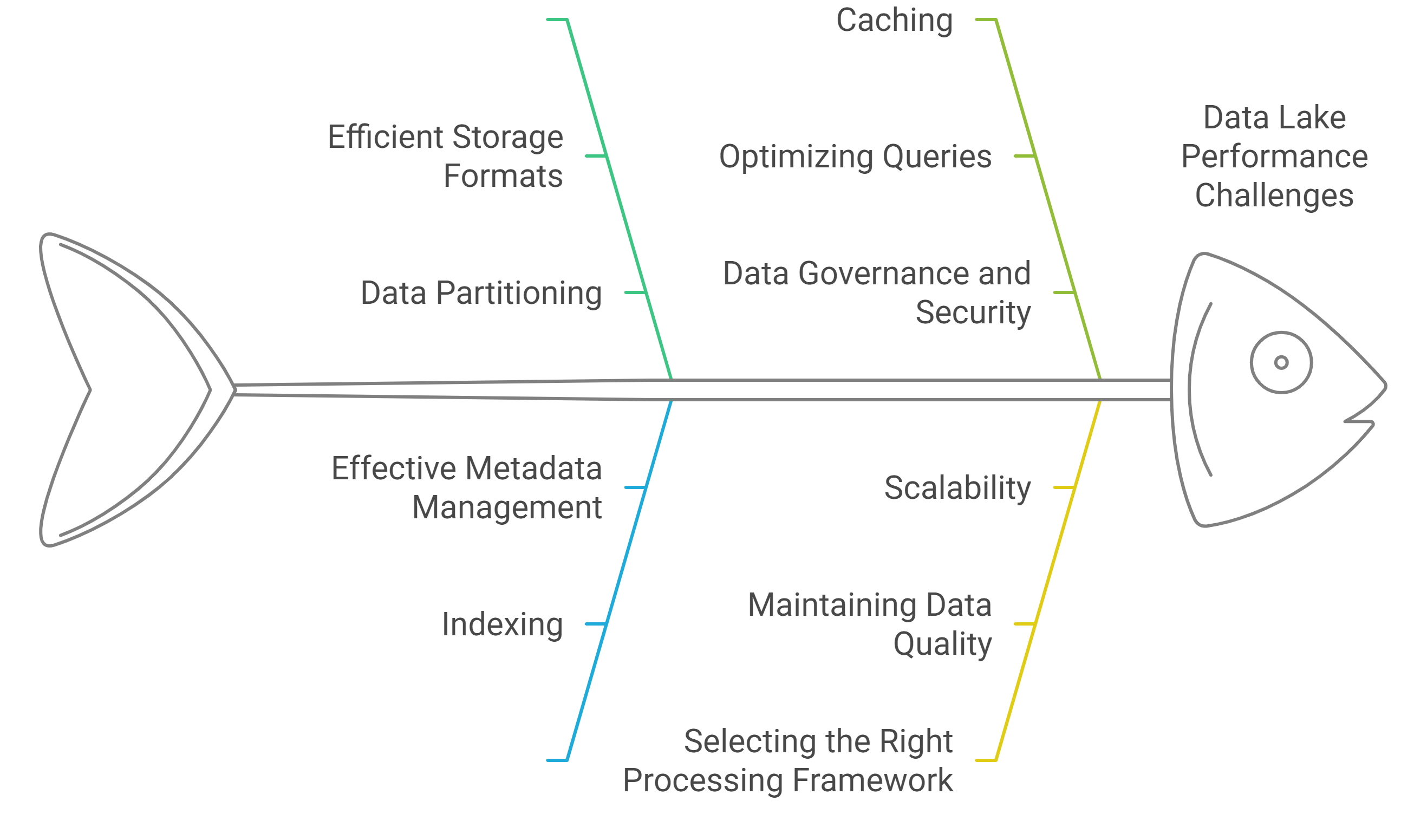
When discussing performance in a data lake, it refers to the efficiency with which data is stored, retrieved, and processed. To ensure high performance in a data lake, several factors need to be addressed:
- Efficient Storage Formats: Opt for optimized formats like Parquet or ORC, which store data in columns, allowing for better compression and faster retrieval, especially when dealing with large datasets.
- Data Partitioning: Dividing large datasets into smaller, more manageable parts (partitions) is crucial. For example, partitioning data by time, region, or product category ensures that only the relevant portion of data is accessed during queries.
- Indexing: Although data lakes are often schema-less, introducing indexes, when supported, or utilizing frameworks like Apache Hudi or Delta Lake, can accelerate query performance and make data access more efficient.
- Effective Metadata Management: Metadata helps in organizing and tracking the structure of data in a lake. Proper metadata management using tools like Apache Hive, AWS Glue, or Databricks Unity Catalog can greatly speed up data processing and query execution.
- Caching: Frequently accessed data can be stored in cache, which significantly reduces retrieval times for repeated queries. A caching layer can help in making data access more responsive.
- Optimizing Queries: Query engines such as Apache Spark, Presto, or AWS Athena can optimize SQL queries, particularly on large datasets. By leveraging distributed computing, these tools can run queries in parallel, improving overall performance.
- Data Governance and Security: While governance and security don’t directly impact performance, maintaining clear data access policies and ensuring encryption can prevent bottlenecks and help sustain operational efficiency.
- Scalability: One of the major benefits of data lakes is their ability to scale. Cloud storage platforms like AWS S3, Azure Data Lake, or Google Cloud Storage enable you to adjust storage capacity as needed. To maintain performance, it's crucial to ensure that your compute resources scale appropriately with the data.
- Maintaining Data Quality: High-quality, clean data reduces the need for time-consuming transformations or error handling, thus speeding up data processing and improving overall performance.
- Selecting the Right Processing Framework: Choose an appropriate data processing engine based on your needs. Solutions like Apache Spark, Flink, or Databricks are designed for handling large volumes of data, and you may opt for batch processing or real-time stream processing depending on your requirements.
2 min readMore
Build a strong foundation in Data & AI
Follow the Data Foundations learning path (Beginner to Advanced).