Once you sign in, your details will show here.
Knowledge Hub
+ New Topic
Filter (1)
Sort
61 topics · Data Integration and Interoperability · 10 shown
Show allEvery topic is free to read. A free account also lets you search the topics, react to a topic and comment under it.
- I Am Datapedia!
Data Integration and Interoperability
Data Interchange
Data Interchange refers to the electronic exchange of information or data between different computer systems, applications, or software. It involves the transmission and reception of structured data to enable seamless communication and integration between disparate systems.
Few Key Points:
- Structured Data Exchange: Data interchange involves the exchange of structured data, often in a standardized format that both the sending and receiving systems can understand.
- Cross-Platform Communication: It facilitates communication between diverse platforms, applications, or software that may have different data structures or operate in distinct environments.
- Standards and Formats: To ensure interoperability, data interchange often relies on industry standards and common formats. Examples include XML (eXtensible Markup Language), JSON (JavaScript Object Notation), or specific data exchange standards in various industries.
- Facilitates Integration: Data Interchange plays a crucial role in integrating different systems and enabling them to work together cohesively. It allows for the sharing of information between applications, databases, or even organizations.
2 min readMore
- I Am Datapedia!
Data Storage and Operations
Data Replication
Data Replication is the process of creating and maintaining multiple copies of the same dataset in different locations or systems. The goal is to ensure data availability, improve fault tolerance, and enhance performance by distributing data across various storage locations. Replicated data can be synchronized in real-time or at scheduled intervals to keep the copies consistent.
For example, imagine you and your classmates are working on a group project, and you need to share a document with everyone. Instead of having a single copy stored on one person's computer, you decide to use data replication to ensure that everyone has access to the most up-to-date version.
Here's how it works:
- Initial Copy: You create a document on your computer with the project details. This is the initial copy.
- Replication: You decide to replicate the document by making copies and distributing them to each group member. Now, everyone has their own copy of the document.
- Changes and Updates: As the project progresses, different group members make changes to their copies based on their contributions. For example, one person adds information about research findings, another updates the formatting, and so on.
- Synchronization: Periodically, or when major changes occur, you decide to synchronize the copies. This means that everyone shares their updates, and each person gets the latest version of the document. This ensures that all copies are consistent and reflect the most recent changes.
2 min readMore
- I Am Datapedia!
Data Governance
Data Collaboration
Data Collaboration in the data world refers to the practice of sharing and working with data across individuals, teams, departments, organizations, or even between different systems to achieve common goals, solve problems, or generate insights. It involves cooperative efforts in handling, analyzing, and deriving value from data assets. Data Collaboration is essential for fostering innovation, improving decision-making, and addressing complex challenges that may require diverse perspectives and expertise.
Key aspects of Data Collaboration include:
- Sharing Data: Organizations and individuals share data sets, information, or insights with one another. This can include internal data sharing within an organization or external sharing between different entities.
- Interdisciplinary Cooperation: Data Collaboration often involves collaboration between individuals with diverse skills and expertise. For example, data scientists, analysts, domain experts, and business professionals may collaborate to extract meaningful insights from data.
- Data Integration: Integrating data from various sources to create a unified view. This could involve merging datasets, connecting databases, or using middleware to facilitate seamless data exchange.
- Secure Data Exchange: Ensuring that data sharing is done securely and in compliance with privacy regulations. This involves implementing measures to protect sensitive information during the collaboration process.
- Open Data Initiatives: Participation in open data initiatives where organizations contribute and access shared datasets for the benefit of the wider community or industry.
- Cross-Functional Projects: Collaborative projects that span different functions or departments within an organization. For example, marketing, finance, and operations teams working together on a data-driven project.
- Data Standards and Governance: Establishing data standards and governance practices to ensure consistency, quality, and reliability of shared data. This helps in maintaining trust among collaborators.
3 min readMore
- I Am Datapedia!
Data Integration and Interoperability
Data Sources
Data Source is essentially where information comes from. It can be anything like a list of customer names in a spreadsheet, sales details in a company's database, or even tweets on social media. These sources can vary in size and complexity, ranging from simple text files to complex, large-scale databases.
In Information Systems, Data Sources can vary. Here are some examples:
- Databases: This is one of the most common data sources. It can be a relational database like MySQL, PostgreSQL, or Oracle, where data is organized in tables, or a NoSQL database like MongoDB or Cassandra, which may store data in more flexible formats.
- Business or Enterprise Applications like CRM and ERP Systems: Systems like Salesforce, SAP, or Oracle ERP are used by organizations to manage customer and business operations data. They serve as rich data sources for analytics and business intelligence.
- Spreadsheet Files: Files like Microsoft Excel or Google Sheets are common sources of data, especially in smaller scale or less technical environments. They store data in tabular form and are widely used for various analytical purposes.
- Flat Files: These include CSV (Comma Separated Values) or Text files etc. They are simple text files used to store data in a structured format and are commonly used for data exchange and storage.
- Cloud Storage: Services like Amazon S3, Google Cloud Storage, or Microsoft Azure Blob Storage. These platforms are used to store large amounts of data in the cloud and are accessible from anywhere.
- Logs: System logs, application logs, web server logs, etc., are used for monitoring, debugging, and security analysis. They provide raw data about the usage and performance of various systems. They can serve as a Data Source for monitoring applications.
2 min readMore
- I Am Datapedia!
Data Integration and Interoperability
Data Streaming
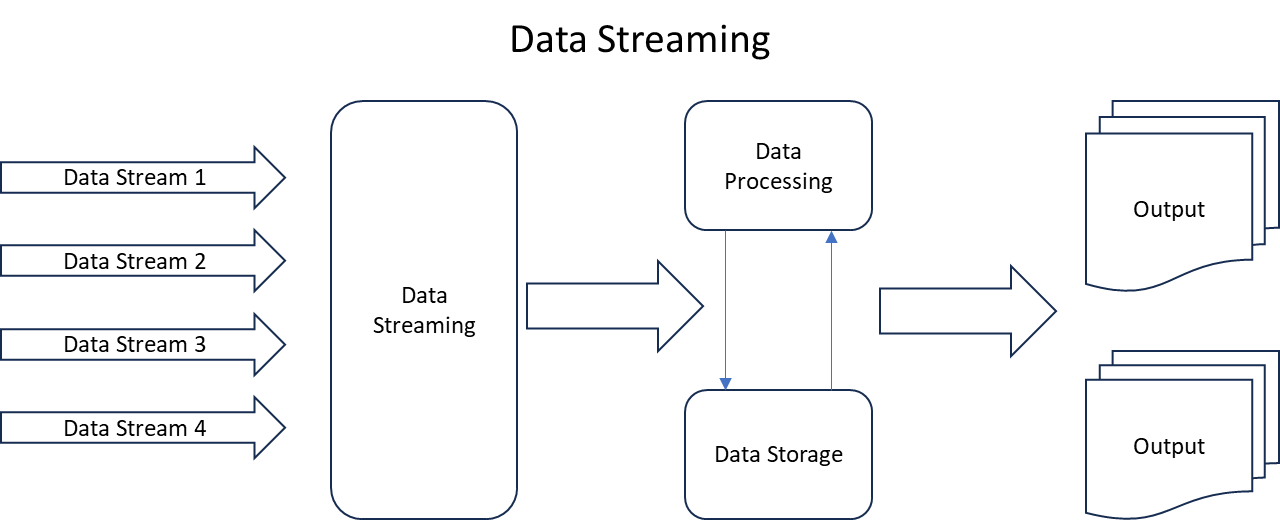
Data Streaming is a method of processing and transmitting data continuously and in real-time rather than in batches. It involves the continuous flow of data from sources to destinations, allowing for the rapid analysis, processing, and dissemination of information.
To understand Data Streaming, suppose data streaming is like water moving in a river on regular basis as compared to a place where water is stored one time with no more coming in. In traditional methods, we collect a bunch of data, like filling a bucket, and then analyze it all at once. On the other hand, in data streaming, it’s like regular pieces of data keep coming in piece by piece, in smaller size, rather than we pull in a huge size in one-go.
Few examples for better understanding.
- Social Media Feeds: Social media platforms use data streaming to show new posts, comments, and updates in real-time. For example, when you refresh your Instagram feed, you instantly see new photos and comments as they are posted.
- Weather Monitoring: Meteorologists use data streaming to receive and analyze continuous weather data. For example, temperature, humidity, and wind speed information are continuously sent and analyzed to provide real-time weather updates.
- Financial Transactions: Banks use data streaming to process and monitor financial transactions in real-time. For example, when you make a purchase with your credit card, the transaction is immediately reflected in your account balance.
- Health Monitoring Devices: Wearable devices use data streaming to provide real-time health information. For example, a fitness tracker continuously measures your heart rate, steps, and sleep patterns, updating your health stats in real-time.
- Traffic Monitoring: Traffic control systems use data streaming to monitor and manage traffic flow. For example, cameras and sensors on roads continuously provide real-time information about traffic conditions, helping optimize traffic signals.
- Online Video Streaming: Services like YouTube or Netflix use data streaming to deliver videos in real-time. For example, when you watch a video online, it starts playing almost instantly, with the data being streamed to your device as you watch.
2 min readMore
- I Am Datapedia!
Data Integration and Interoperability
Batch Processing
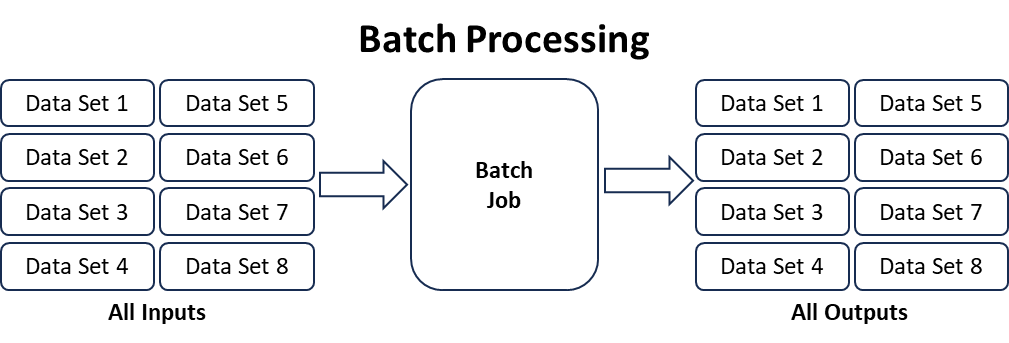
Batch Processing is a method of handling data in large quantities by grouping it into sets, or batches, and processing those sets together at scheduled intervals. Unlike real-time processing, where data is handled immediately, batch processing involves accumulating data over a period and then processing it as a group.
Think of batch processing like doing your homework assignments at the end of the day rather than right after each class. You collect all the tasks and work on them together. Similarly, in batch processing, data is gathered over time, and then, as a batch, it's processed all at once.
Few examples for better understanding.
- Grade Processing in Schools: Teachers collect students' assignments, quizzes, and tests over a week and then enter grades into the system at the end of the grading period. For example, instead of entering each student's grade immediately after they submit an assignment, the teacher waits and processes grades for the entire class at once.
- Bank Transactions: Banks often update account balances and transactions overnight, processing all the transactions that occurred during the day in a batch. For example, if you deposit money or make a purchase, the transaction might not immediately reflect in your account balance; it's updated in a nightly batch.
- Payroll Processing: Companies often process payroll in batches, calculating and distributing salaries at specific intervals. For example, employee work hours, overtime, and other payroll-related information are collected over a pay period and processed together to generate paychecks.
- Inventory Management: Retailers may update their inventory levels in batches rather than immediately after each sale. For example, Sales data is collected throughout the day, and inventory levels are adjusted during a nightly batch process.
- Billing and Invoicing: Utility companies may process billing information in batches, generating bills for all customers at specific intervals. For example, Instead of generating a bill for each customer as soon as they use a service, bills are created in a batch at the end of the billing cycle.
- Batch Photo Editing: When editing photos, a batch processing approach may be used to apply the same set of edits to multiple photos simultaneously. For example, if you want to resize, crop, or apply a filter to a set of pictures, you can process them all together in a batch.
- Report Generation: Organizations often generate reports based on collected data at specific intervals, such as daily or monthly. For example, Sales reports, customer analytics, or website traffic reports may be generated in batches to provide a comprehensive overview.
3 min readMore
- I Am Datapedia!
Data Integration and Interoperability
Delta Sharing
First, I wanted to name this topic as Data or Delta Sharing but to make it more interesting, kept it as Delta Sharing ONLY 😊.
Let’s decode it…..
We all have heard about Data Sharing. It is about sharing data across departments, across branches, across organizations or in DaaS model (explained separately) with the open wide world. In preceding era, Data was not huge, Data was not treated as THE SUCCESS factor, but it felt it is. So, sharing data to other entities was OK, giving them data itself was OK.
But in the current era where data has exponentially grown, and data has become THE SUCCESS factor for any organization. Plus, due to the data size, it’s no longer possible to transfer data even if it is, it’s not in timely manner, secondly due to Data Sovereignty, organizations don’t want their data to move out of their datastores.
Above scenario was even possible in previous era where, to others, we used to give access in our environment but on a very limited basis as accessing our environment or our databases used to impact our performance and used to impact our applications which was not acceptable, that is the reason we started masking or anonymizing data and started exporting actual data to other datastores.
2 min readMore
- I Am Datapedia!
Data Integration and Interoperability
CDC vs CDC Framework
CDC framework is much more than CDC as a feature or as a capability by a tool. There are many tools in the market which can just extract CDC data from database which is only the first step in whole CDC framework.
CDC: Full abbreviation of CDC is Change Data Capture, meaning the moment, the data is changed in database ONLY THE CHANGED DATA gets picked up by the CDC process and pushed to next layer. Changed data can be like 1) a new row can be added or 2) an existing row can be updated or 3) a previously added row can be deleted or dropped.
This whole process can be Real-Time but mostly can't as Real-Time + CDC needs a lot of memory processing which comes with heavy TCO, so it all depends on ROI for the related Business Case.
CDC Framework: Extracting only changed data is not the end of settling data to be presented in Dashboards or Reporting, there are two more steps one must complete before changed data is considered useful.
4 min readMore
- I Am Datapedia!
Data Integration and Interoperability
Standardization vsTransformation
These are one of the most confusing topics. We all mix-up data quality fixes and standardization of data for better processing with transforming data for better processing and serving.
Let’s decode it…..
We all know, in Data Warehouse or when we pull data from an OLTP system, we first store it in a LANDING ZONE somewhere which normally is the true copy of source systems. Then we move it to STAGING ZONE before we transform it into a Unified Data Warehouse (Bill Inmon way) or in a Dimensional Model (Ralph Kimble way).
Tables in LANDING and STANGING ZONES, both keep the true DATA MODEL from source systems but not the CONDITION of DATA.
WHAT DOES ABOVE STATEMENT MEANS, not the CONDITION of DATA?
Data Standardization
Does standardizing the condition of data not equal to transformation? NOPS, ITS NOT. Data Standardization can have unlimited scenarios, few are shared below e.g.,
- Standardization of Dates:
- Converting different dates formats from different source systems e.g., DD/MM/YY, MM/DD/YY, YY/MM/DD, YY/DD/MM etc., into one format e.g., DD/MM/YYYY.
- Convert empty date rows into e.g., 01/01/9999.
- Convert special characters to NA.
- Convert empty fields to NA.
- Profile the fields, if data type is string or varchar but data is only number than convert it into digit or number as running queries on digit or numbers are way faster.
- If the field contains codes only with only character, then make it CHAR and if it only contains numbers then make it DIGIT.
- If the full name of a person is in one field, convert it in First, Middle and Last Name.
- Fix the spelling mistakes.
- Fix the up and lower cases e.g., if a country is Australia and in data its coming as Aus, Aust, australia, Aussie, aus etc., than convert it in one format e.g., Australia.
3 min readMore
- Standardization of Dates:
- I Am Datapedia!
Data Integration and Interoperability
Semantic Interoperability
Semantics are different for everyone. In an organization, each department has its own semantics, to view data. Same data can have different meanings for one department as compared to others.
Salary for HR department is to know who is getting what and when they hire new candidate, they can refer to what others are getting based on role, JD, skill set etc.. But Salary for Finance department can be, to calculate annual expense for the company.
Semantic Layer in Decision Support Systems are based on business requirements, in their language, using their own key words, their codes etc.
Interoperability on the other hand is about exchanging something across systems so others don’t need to regenerate it again and again.
Semantic Interoperability is about exchanging semantic information across systems or across departments or across organizations. But this comes with a challenge whether the receiving party can understand the keywords, symbols, terminologies etc., from the sending party.
2 min readMore
Build a strong foundation in Data & AI
Follow the Data Foundations learning path (Beginner to Advanced).