Once you sign in, your details will show here.
Knowledge Hub
+ New Topic
Filter (1)
Sort
383 topics · I Am Datapedia! · 10 shown
Show allEvery topic is free to read. A free account also lets you search the topics, react to a topic and comment under it.
- I Am Datapedia!
Data Warehousing and Business Intelligence
Type of Analytics
We have already gone through Analysis and Analytics. Analytics refers to the systematic analysis of data or statistics to uncover meaningful patterns, insights, and trends. There are several types of analytics, each serving specific purposes and addressing different aspects of data analysis.
The major types of analytics include:
- Descriptive Analytics: It describes what has happened in the past, providing a historical overview. For example, summarizing sales data to understand total revenue for a specific period.
- Diagnostic Analytics: It focuses on why a particular event or trend occurred by identifying its root causes. For example, investigating a drop in website traffic to determine the reasons behind the decline.
- Predictive Analytics: It predicts future outcomes or trends based on historical data and statistical algorithms. For example, using machine learning models to predict customer churn or stock prices.
Prescriptive Analytics: It recommends actions to optimize outcomes based on predictive analytics results. For example, suggesting marketing strategies to increase customer retention based on predictive insights.
- Other types of analytics include:
- Text Analytics (Text Mining): It analyzes unstructured text data to extract insights, sentiment, or patterns. For example, analyzing customer reviews to understand sentiment and identify common themes.
- Spatial Analytics: It analyzes geographic or location-based data to uncover spatial patterns and relationships. For example, mapping crime rates in a city to identify high-crime areas.
- Social Media Analytics: It analyzes social media data to understand trends, sentiments, and user interactions. For example, monitoring brand mentions on social media to assess brand sentiment.
- Web Analytics: It analyzes website data to understand user behavior, track performance, and optimize user experience. For example, tracking page views, bounce rates, and click-through rates on a website.
- Business Intelligence (BI): It involves the use of tools and processes to analyze and visualize business data for decision-making. For example, creating dashboards to monitor key performance indicators (KPIs) in real-time.
- Big Data Analytics: It analyzes large and complex datasets to uncover hidden patterns and insights. For example, analyzing vast amounts of sensor data for predictive maintenance in manufacturing.
- Customer Analytics: It analyzes customer data to understand behavior, preferences, and trends. For example, creating customer segmentation based on purchasing patterns.
3 min readMore
- I Am Datapedia!
AI and Machine Learning
MRKL
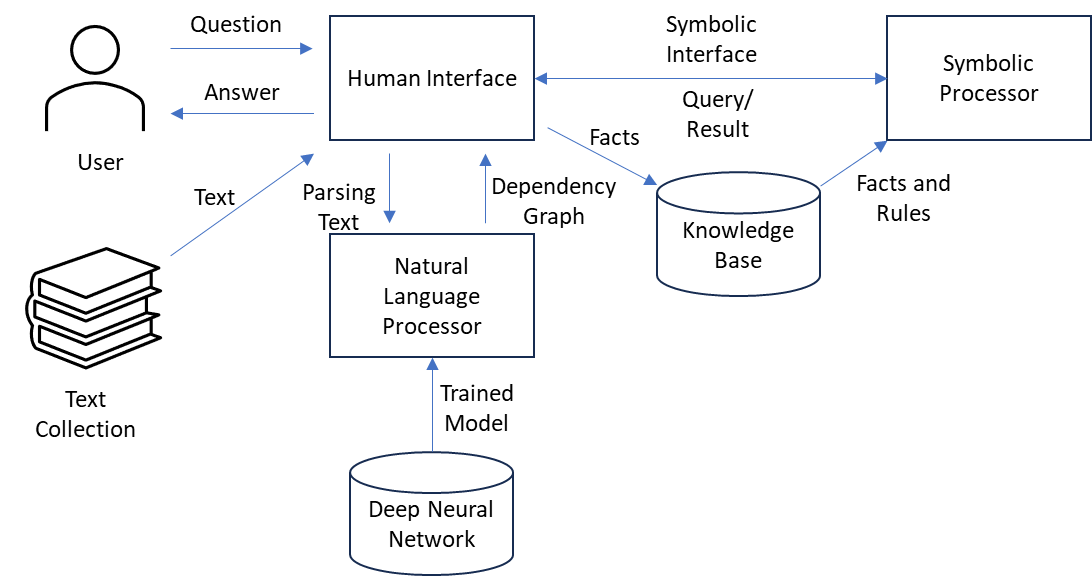
MRKL stands for Modular Reasoning, Knowledge, and Language. This neuro-symbolic architecture is designed to address complex problems by combining elements of neural computation (specifically Large Language Models, or LLMs) with symbolic computation tools such as calculators. (ref: LLM is separate topic)
Neuro-Symbolic Architecture implies that the system combines aspects of neural computation (associated with LLMs) and symbolic computation. Neural computation involves processing information in a way inspired by the human brain, while symbolic computation involves manipulating symbols to perform operations.
LLMs (Large Language Models) are sophisticated artificial intelligence models trained on extensive text data. They surpass in recognizing and producing human-like dialect.
External Tools Like Calculators in addition to neural computation, the system incorporates external symbolic computation tools, specifically mentioning calculators. This suggests a hybrid approach where both neural and symbolic methods are employed.
2 min readMore
- I Am Datapedia!
Data Storage and Operations
FinOps
FinOps is a term derived from "financial operations." It represents a set of practices and principles aimed at optimizing the financial aspects of cloud computing especially in an era where Cloud is the to-go approach for everyone.
- Management Practice: FinOps is not just a set of guidelines; it's a management practice, indicating that it involves a structured and ongoing approach to managing financial aspects within the context of cloud operations.
- Shared Responsibility: One of the central tenets of FinOps is the promotion of shared responsibility. This means that financial considerations are not solely the concern of the finance department; instead, there is a collective responsibility across different organizational functions.
- Cloud Computing Infrastructure: FinOps is specifically tailored to address the financial aspects related to cloud computing infrastructure. This includes services, resources, and functionalities provided by cloud service providers such as AWS, Azure, or Google Cloud.
- Cost Management: The primary focus of FinOps is on effectively managing the costs associated with cloud usage. This involves understanding, optimizing, and controlling expenditures to ensure they align with business goals.
- Organizational Involvement: FinOps encourages participation and collaboration across various teams within an organization. It brings together stakeholders from finance, operations, and IT/engineering to collectively manage and optimize cloud costs.
- Efficiency and Optimization: The ultimate goal of FinOps is to enhance efficiency and optimize cloud spending. This may involve identifying cost-saving opportunities, optimizing resource usage, and making informed decisions to achieve a balance between cost, performance, and reliability.
- Continuous Improvement: FinOps is not a one-time initiative but a continuous improvement process. Teams regularly assess, analyze, and refine their practices to adapt to changing business needs and technological advancements.
- Educational Component: The statement doesn't explicitly mention it, but part of FinOps often includes educational initiatives. Teams are educated about cloud financial management practices to enhance their understanding of how their decisions impact costs.
2 min readMore
- I Am Datapedia!
Data Quality
Testing vs QA
Testing and Quality Assurance (QA) are commonly mixed up, but let's break down the differences.
Testing:
Testing is about discovering problems or bugs in processes or code, either during or after implementation. Various stages of testing happen during an IT project, such as Unit Testing (checking individual parts), System Integration Testing (verifying components work together), and User Acceptance Testing (ensuring the solution meets user requirements).
QA (Quality Assurance):
QA, on the other hand, is all about making sure that the standards and output of processes or solutions meet customer satisfaction. Even if testing doesn't find bugs, QA checks if the output aligns with the expected quality. For example, if we create a table with a million rows, testing may show all rows are there, but QA might reveal differences in country name spellings or data formats.
For example, imagine you're building a database with country names. Testing might confirm that all million rows are there, but QA would catch if the spellings were inconsistent or if data formats are not uniform.
2 min readMore
- I Am Datapedia!
Others
Difference between IT and Digital
The terms "IT" (Information Technology) and "Digital" are related but refer to different concepts within the broader technological landscape.
Information Technology (IT) encompasses the use, development, and management of computer systems, software, networks, and information. It is primarily concerned with the technology used to store, retrieve, transmit, and manipulate data. For example, IT includes hardware (computers, servers, storage), software (applications, operating systems), networking (local area networks, wide area networks), and the management of databases and information systems. IT is essential for the efficient storage, processing, and communication of information within organizations.
Digital is a broader term that extends beyond just technology and includes the transformation of processes, businesses, and society through the use of digital technologies. It is concerned with the integration of digital technologies into various aspects of life and business to improve efficiency, create new opportunities, and enhance experiences. For example, Digital transformation involves not only IT but also areas such as data analytics, artificial intelligence, internet of things (IoT), cloud computing, and other emerging technologies. Digital initiatives aim to leverage technology to bring about fundamental changes in how organizations operate, interact with customers, and deliver value.
2 min readMore
- I Am Datapedia!
Data Storage and Operations
Sandbox
Sandbox typically refers to a controlled and isolated environment where data scientists, analysts, or developers can explore, test, and experiment with data without affecting the production environment. The concept is borrowed from the idea of a children's sandbox, where they can play and experiment freely within a confined area.
Here are key aspects of a Data Sandbox:
- Isolation: A Data Sandbox is isolated from the production environment to prevent any unintended consequences or disruptions. It allows users to experiment without affecting critical systems or data.
- Experimentation and Testing: Users can perform various activities, such as running queries, testing algorithms, or developing and refining code, in a risk-free environment. This is crucial for data analysis, machine learning, and software development.
- Data Exploration: Data Sandboxes often provide a space for exploring datasets, trying out different queries, and gaining insights without altering the original data or systems.
- Prototyping: Data scientists and developers can use the sandbox to prototype new solutions, algorithms, or models before deploying them to the production environment.
- Learning and Training: Sandboxes are valuable for training purposes. Data professionals can use them to train and educate others without the risk of impacting live systems.
- Security and Access Control: While sandboxes are designed for experimentation, they still need to adhere to security best practices. Access controls and permissions are implemented to ensure that sensitive or confidential data is not misused.
- Version Control: Some Data Sandboxes incorporate version control mechanisms, allowing users to track changes and revert to previous states if needed.
- Data Masking and Anonymization: To comply with privacy regulations, data in a sandbox may be masked or anonymized to protect sensitive information while still allowing meaningful analysis.
- Integration with Development Processes: Sandboxes are often integrated into the overall development and deployment processes, enabling a seamless transition from testing and experimentation to production deployment.
2 min readMore
- I Am Datapedia!
Data Storage and Operations
House Keeping
Housekeeping refers to the routine maintenance, organization, and management tasks that are necessary to ensure data quality, integrity, and efficiency. It involves activities such as cleaning, organizing, and optimizing data to keep databases, data warehouses, and other storage systems in good order.
With an optimistic outlook, effective housekeeping measures have the potential to save approximately 30% of operational costs.
Here are some examples of housekeeping tasks in the Data World:
- Data Cleaning: Identifying and rectifying errors, inconsistencies, or missing values in datasets. For example, if you have a dataset with student information, data cleaning may involve fixing typos in names, standardizing date formats, and filling in missing grades.
- Data Deletion: Removing obsolete or unnecessary data to free up storage space and reduce clutter. For example, deleting records of students who have graduated or left the school to keep the dataset relevant and manageable.
- Backup and Recovery: Regularly creating copies of data to prevent loss and establishing procedures for data recovery in case of accidental deletion or system failure. For example, saving multiple copies of your project work on different devices to avoid losing progress if a file becomes corrupted.
- Data Archiving: Moving older or less frequently used data to long-term storage to optimize performance in the primary data storage system. For example, archiving past school year records to a separate folder to keep the current year's data easily accessible.
- Indexing: Creating indexes on databases to accelerate data retrieval and query performance. For example, indexing a list of books by title or author's name for quicker reference when searching for specific information.
- Data Encryption: Applying encryption to sensitive data to protect it from unauthorized access. For example, using encryption tools to secure personal information in a project related to online privacy.
- Metadata Management: Organizing and documenting metadata (data about data) to enhance understanding and usability. For example, creating a spreadsheet that documents the meaning and format of each column in a dataset.
- Data Purging: Removing data that is no longer needed or relevant, especially in compliance with data retention policies. For example, deleting survey responses from previous years to keep the dataset focused on recent data.
- Performance Optimization: Fine-tuning databases and queries to improve overall system performance. For example, adjusting settings in a gaming app to improve its performance on a smartphone.
3 min readMore
- I Am Datapedia!
Data Governance
SLA
SLA stands for "Service Level Agreement" A Service Level Agreement is a contractual agreement or commitment between a service provider and a customer that outlines the level of service expected, including the quality, availability, and responsibilities related to the service. SLAs are commonly used in various industries, including the data and technology sectors.
Here's a breakdown of key aspects of SLAs in the data world:
- Quality of Service: Specifies the expected quality, accuracy, and reliability of the data service. For example, a data storage service may have an SLA stating that data will be stored securely, with minimal risk of loss or corruption.
- Availability: Defines the agreed-upon level of uptime or availability for a data service. For example, an SLA for a cloud-based data storage service might guarantee 99.9% uptime, ensuring that the service is accessible to users for the vast majority of the time.
- Response Time: Outlines the expected time frame within which the service provider commits to respond to queries, issues, or requests. For example, an SLA for a data analytics platform may specify that support tickets will be addressed within 24 hours.
- Data Security and Privacy: Addresses the security measures in place to protect data and the adherence to privacy regulations. For example, an SLA for a data processing service may include provisions for encryption, access controls, and compliance with data protection laws.
- Scalability: Defines how the service will scale to accommodate increased data volumes or user demands. For example, an SLA for a cloud-based database service might specify the procedures for scaling resources based on increased data loads.
- Data Backup and Recovery: Outlines procedures for regular data backups and the expected timeframe for data recovery in case of a failure. For example, an SLA for a data storage service might include provisions for daily backups and a commitment to restoring data within 48 hours in case of a system failure.
- Compliance: Addresses adherence to relevant industry standards, regulations, and legal requirements. For example, an SLA for a healthcare data management system might specify compliance with healthcare data privacy regulations such as HIPAA.
- Termination and Penalties: Outlines conditions under which either party can terminate the agreement and may include penalties for non-compliance. For example, an SLA might specify the process for termination if the service provider consistently fails to meet agreed-upon service levels.
3 min readMore
- I Am Datapedia!
Data Integration and Interoperability
Watermark
A Watermark is a recognizable image or pattern embedded into a digital or physical document to identify its authenticity or to protect the document from unauthorized use. Watermarks are commonly used in various contexts, including photography, art, documents, and currency.
In the context of digital media, such as images or videos, a watermark is often a semi-transparent logo or text that is overlaid onto the content. This watermark serves several purposes:
- Copyright Protection: Content creators often use watermarks to assert their ownership of the material. This discourages unauthorized use and helps in identifying the original creator.
- Branding: Watermarks can also be used for branding purposes. Companies may add their logos or brand names as watermarks to promote brand recognition even when the content is shared online.
- Security: Watermarks can be used to secure confidential or sensitive documents. For example, companies might add watermarks to internal documents to discourage leaks or unauthorized distribution.
- Authentication: In the case of physical documents, such as banknotes or certificates, watermarks can be embedded during the papermaking process. These watermarks serve as a form of authentication to verify the document's legitimacy.
2 min readMore
- I Am Datapedia!
Data Storage and Operations
Views
Views are fundamental in the world of data, serving as a foundational concept. Although it may seem basic, understanding views is crucial as we will delve into more advanced topics such as Materialized Views and External Tables.
Let's break it down...
In the realm of databases, we are familiar with tables, structured with columns and rows, each representing a specific dataset post-normalization (a topic we'll cover separately). Examples include tables for employees, departments, and salaries.
Now, imagine the need to combine information from these tables, like obtaining a comprehensive view of a customer's department and salary. To achieve this, we would typically construct a query that involves joining these tables, providing us with a consolidated result.
However, if we find ourselves running this query frequently, perhaps on a daily or monthly basis, creating a "view" becomes advantageous. A view allows us to encapsulate the query and, when needed, execute a simple SELECT command on the view to retrieve the combined results from the employee, department, and salary tables.
2 min readMore
Build a strong foundation in Data & AI
Follow the Data Foundations learning path (Beginner to Advanced).