Once you sign in, your details will show here.
Knowledge Hub
+ New Topic
Filter (1)
Sort
96 topics · Beginner · 10 shown
Show allEvery topic is free to read. A free account also lets you search the topics, react to a topic and comment under it.
- I Am Datapedia!
Data Integration and Interoperability
Data Integration andInteroperability
Many people mistakenly assume that Integration and Interoperability are interchangeable terms, but they are actually quite different. While they work together, their nature and purpose are distinct.
Let’s decode these…..
Integration involves connecting systems and exchanging data to fulfill a range of objectives [Data Integration explained in different topics]. However, when data is shared between systems, it often requires translation to be understood by the receiving party. Despite the successful integration of systems, these translations conflict with the essence of interoperability.
Interoperability, on the other hand, is the ability to understand data without the need for translation. When two or more systems are linked and exchange data seamlessly without requiring translation for comprehension by the receiving parties, it signifies the presence of interoperability. A notable instance of interoperability is evident in the medical domain, where various hospitals can readily interpret key terms and codes within shared data, whereas an average individual may struggle to do so.
1 min readMore
- I Am Datapedia!
Others
Data Futurology
Foresight and Futurology are used interchangeably. And yes you are right this new term is not something we have never encountered before.
Let’s decode it…..
Data: Refers to information, facts, or statistics collected for analysis, reference, or computation.
Futurology: It's the study or soothsaying of possible futures. It involves examining current trends and making prognostications about unborn developments.
Combining these," Data Futurology" suggests concentrating on the future of data, in terms of how data is collected, reused, anatomized, and its impact on colorful aspects of society or technology.
Let go little deeper about conception of" Data Futurology," which involves the study and soothsaying of possible futures related to data.
Let's break it down:
- Study or Forecasting of Possible Futures
- This refers to the practice of examining current trends and making predictions about future developments. It involves analyzing data and information to anticipate how various aspects of a particular field might evolve over time.
- Data Futurology
- This term specifically focuses on the future of data. It encompasses the entire data lifecycle, including how data is collected, processed, and analyzed. Additionally, it explores the potential impact of data on different aspects of society and technology.
2 min readMore
- I Am Datapedia!
Data Governance
Data Literacy Assessment
Data Literacy Assessment involves evaluating an individual's ability to understand, interpret, and work with data effectively. It measures how well someone can read, analyze, and draw insights from data.
Let's elaborate on each aspect of data literacy assessment:
- Data Understanding: This aspect assesses an individual's ability to comprehend and make sense of the data presented. It involves understanding the data structure, variables, and context. For example, imagine you have a table with information about the number of apples sold each day at a fruit stand. A data literacy assessment might ask you to look at the table and answer questions like, "On which day were the most apples sold?" This tests your ability to understand the data presented.
- Data Interpretation: It evaluates how well someone can analyze and draw meaningful insights from the data. It includes recognizing patterns, trends, and relationships within the dataset. For example, you are given a chart showing the temperature variations over a week. A data literacy assessment could ask, "What can you conclude about the weather during this week?" This evaluates your capacity to interpret data trends and draw meaningful conclusions.
- Data Presentation: It focuses on the skill of effectively communicating data findings. It involves selecting appropriate visualizations or formats to convey information clearly to a specific audience. For example, suppose you are asked to create a simple bar chart using data about the number of books read by different students. This assesses your ability to choose an appropriate way to present data visually.
- Data Analysis: It evaluates an individual's capability to process and manipulate data to uncover patterns, correlations, and trends. It entails making use of statistical and computational strategies to derive insights. For example, you are provided with a data set on students' test scores and attendance. A data literacy assessment might request you to identify if there's a correlation between attendance and academic performance. This tests your ability to analyze data for patterns and relationships.
- Problem-Solving with Data: This aspect assesses the ability to use data to solve real-world problems. It involves applying data-driven approaches to make informed decisions and address challenges. For example, given data on the growth of plants under different conditions, a data literacy assessment could ask, "Which condition is most favorable for plant growth, and why?" This evaluates your capability to apply information to resolve real-international problems.
- Data Ethics: It examines an individual's understanding of ethical considerations related to data. It involves recognizing and addressing issues such as privacy, consent, and fairness in the handling of data. For example, you are presented with a scenario where a company is collecting customer data. A data literacy assessment might ask, "What ethical considerations should the company take into account when handling this data?" This assesses your understanding of ethical implications related to data.
- Data Communication: It assesses how well someone can convey data insights to others. It entails growing reports, visualizations, or narratives that efficiently talk findings to each technical and non-technical audience. For example, you are given a dataset on pollution levels in a city. A data literacy assessment could ask you to prepare a short report for a non-technical audience, explaining the findings and potential implications. This tests your ability to communicate data insights effectively.
- Critical Thinking with Data: Critical thinking with data evaluates the ability to approach data with a questioning mindset. It involves considering alternative perspectives, asking relevant questions, and identifying potential biases in the data. For example, you receive data about the popularity of different sports in a school. A data literacy assessment might ask, "What other information would you need to determine the factors influencing students' sports preferences?" This assesses your analytical reasoning abilities in consuming data.
4 min readMore
- I Am Datapedia!
Data Integration and Interoperability
Data Sources
Data Source is essentially where information comes from. It can be anything like a list of customer names in a spreadsheet, sales details in a company's database, or even tweets on social media. These sources can vary in size and complexity, ranging from simple text files to complex, large-scale databases.
In Information Systems, Data Sources can vary. Here are some examples:
- Databases: This is one of the most common data sources. It can be a relational database like MySQL, PostgreSQL, or Oracle, where data is organized in tables, or a NoSQL database like MongoDB or Cassandra, which may store data in more flexible formats.
- Business or Enterprise Applications like CRM and ERP Systems: Systems like Salesforce, SAP, or Oracle ERP are used by organizations to manage customer and business operations data. They serve as rich data sources for analytics and business intelligence.
- Spreadsheet Files: Files like Microsoft Excel or Google Sheets are common sources of data, especially in smaller scale or less technical environments. They store data in tabular form and are widely used for various analytical purposes.
- Flat Files: These include CSV (Comma Separated Values) or Text files etc. They are simple text files used to store data in a structured format and are commonly used for data exchange and storage.
- Cloud Storage: Services like Amazon S3, Google Cloud Storage, or Microsoft Azure Blob Storage. These platforms are used to store large amounts of data in the cloud and are accessible from anywhere.
- Logs: System logs, application logs, web server logs, etc., are used for monitoring, debugging, and security analysis. They provide raw data about the usage and performance of various systems. They can serve as a Data Source for monitoring applications.
2 min readMore
- I Am Datapedia!
Data Integration and Interoperability
Batch Processing
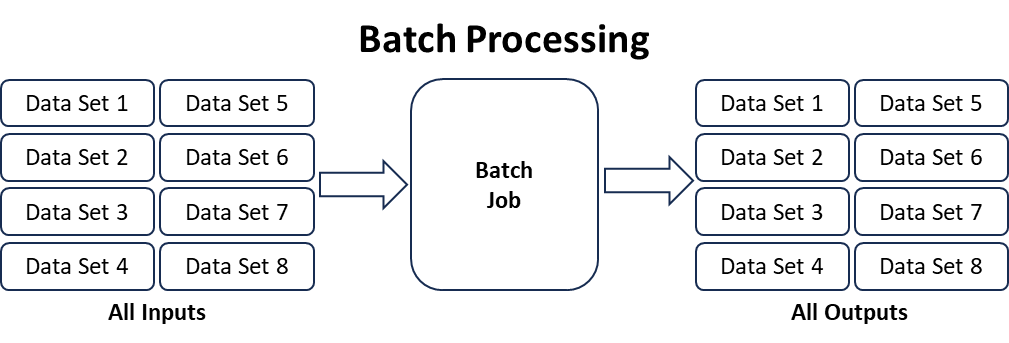
Batch Processing is a method of handling data in large quantities by grouping it into sets, or batches, and processing those sets together at scheduled intervals. Unlike real-time processing, where data is handled immediately, batch processing involves accumulating data over a period and then processing it as a group.
Think of batch processing like doing your homework assignments at the end of the day rather than right after each class. You collect all the tasks and work on them together. Similarly, in batch processing, data is gathered over time, and then, as a batch, it's processed all at once.
Few examples for better understanding.
- Grade Processing in Schools: Teachers collect students' assignments, quizzes, and tests over a week and then enter grades into the system at the end of the grading period. For example, instead of entering each student's grade immediately after they submit an assignment, the teacher waits and processes grades for the entire class at once.
- Bank Transactions: Banks often update account balances and transactions overnight, processing all the transactions that occurred during the day in a batch. For example, if you deposit money or make a purchase, the transaction might not immediately reflect in your account balance; it's updated in a nightly batch.
- Payroll Processing: Companies often process payroll in batches, calculating and distributing salaries at specific intervals. For example, employee work hours, overtime, and other payroll-related information are collected over a pay period and processed together to generate paychecks.
- Inventory Management: Retailers may update their inventory levels in batches rather than immediately after each sale. For example, Sales data is collected throughout the day, and inventory levels are adjusted during a nightly batch process.
- Billing and Invoicing: Utility companies may process billing information in batches, generating bills for all customers at specific intervals. For example, Instead of generating a bill for each customer as soon as they use a service, bills are created in a batch at the end of the billing cycle.
- Batch Photo Editing: When editing photos, a batch processing approach may be used to apply the same set of edits to multiple photos simultaneously. For example, if you want to resize, crop, or apply a filter to a set of pictures, you can process them all together in a batch.
- Report Generation: Organizations often generate reports based on collected data at specific intervals, such as daily or monthly. For example, Sales reports, customer analytics, or website traffic reports may be generated in batches to provide a comprehensive overview.
3 min readMore
- I Am Datapedia!
Data Security
Cyber Security forData Solution
Implementing a robust cybersecurity strategy involves encryption, regular audits, access controls, employee training, and staying updated on emerging threats to safeguard sensitive information effectively.
Few pointers:
- Data Encryption: Employ end-to-end encryption to protect data during transmission and at rest. Utilize strong encryption algorithms to secure sensitive information.
- Access Controls: Implement strict access controls, granting users only the permissions necessary for their roles. Regularly review and update access privileges to ensure they align with current job responsibilities.
- Regular Audits: Conduct periodic security audits to identify vulnerabilities and weaknesses. Regularly assess and update security policies based on audit findings to address new threats.
- Employee Training: Provide comprehensive cybersecurity training for employees to raise awareness about potential threats. Promote a culture of security consciousness to minimize human-related risks, such as phishing attacks.
- Incident Response Plan: Develop and regularly test an incident response plan to respond to security incidents swiftly and effectively. Clearly define roles and responsibilities to minimize downtime during an incident.
- Data Backups: Establish regular and secure data backup procedures to ensure quick recovery in case of data loss or a security breach. Store backups in a remote location to save you from being compromised.
- Network Security: Employ firewalls, intrusion detection and prevention systems to monitor and protect the network. Regularly update and patch software to address known vulnerabilities.
- Vendor Security Assessment: Assess and monitor the cybersecurity measures of third-party vendors handling your data. Ensure vendors comply with security standards and protocols.
- Security Patching: Regularly apply security patches and updates to all systems and software to address known vulnerabilities. Monitor for vulnerabilities that may require immediate attention.
- Data Lifecycle Management: Implement data retention and destruction policies to minimize the risk of unauthorized access. Clearly define how data is collected, processed, stored, and disposed of throughout its lifecycle.
2 min readMore
- I Am Datapedia!
Others
POC
POC stands for Proof of Concept. POC normally follows Sales Context of the product.
In POC, output is most important, not technology. In POC, the implementers make sure output is fulfilling customer requirements and at the same time convince business that this is the solution to go with.
The Goal of POC is to make sure whether Idea is Feasible or not.
‘POC is built and run for Business Users.’
1 min readMore
- I Am Datapedia!
Others
Prototype
Protype is the next stage of POC. In POC, one has test that yes Idea is Feasible, and it will benefit business agenda.
Now, in Prototyping, tools and technologies comes into picture where one starts converting Ideas in Reality, where it will show how the end-result will look like. It will show, how product will look like. It will show the real end solution.
Prototype is not built considering that business users will jump in and start using it. Prototypes are normally for technical folks to evaluate the end results with dumpy but relevant data.
’Prototype is built and run for Technical Users.’
1 min readMore
- I Am Datapedia!
Others
Pilot or MVP
New name of Pilot is MVP 😊. MVP is the next stage of Prototyping where Tools and Technologies are tested, and end solution is tested by technical folks. Now in MVP, subset of actual requirements is considered, subset of real data is used, subset of hardware and infrastructure is used, subset of software is used, and limited number of features are implemented.
Once MVP is ready, it’s released to actual users to start using it. This gives business users a taste of the actual solution. The biggest advantage of this approach is, with small implementation, with small investment, business can taste the blood and take a decision to go to the next stage or drop the solution.
Now a days, many organizations divide complete solution into multiple MVP(s) i.e., by implementing solutions in chunks, this is also supported by Agile approach where product gets ready in shorter timeframes and then keeps maturing with time. In MVP, just like actual implementation, three environments are spin i.e., DEV, UAT and PROD, along with all the steps like DevOps, CI/CD, Metadata Management, Data Quality, Data Governance, Data Lineage, Master and Reference Data Management, and many other steps which are required to go to Production.
2 min readMore
- I Am Datapedia!
Data Storage and Operations
CRUD and CRAP
CRUD and CRAP functions are our daily used processes for data folks, but surely by name most are not aware of these words 😊.
Let’s decode these…..
As we have been using structured data for the last few decades, we know how to create, read, update, and delete. These basic functions which we use in any database are called CRUD data.
Now, the new era, the current era, surfaced where data started to flow-in with high velocity from web logs, social streams, CCTV, sensor data, videos, Facebook, or Tweeter data, mobile, geo-spatial, and so on. All this data has nothing to do with transactional data, so we used to call it CRAP data 😊. But now these have become one of the most valuable assets of any organization. The speed this data is coming, it’s normally not possible to update or delete it so it’s been created, replicate, appended, and process only.
CRUD stands for Create, Read, Update, and Delete
1 min readMore
Build a strong foundation in Data & AI
Follow the Data Foundations learning path (Beginner to Advanced).